Guide
How to manage notifications and quiet hours

Notifications are useful when they are welcome and annoying when they are not. Lovie gives you a simple set of switches so you stay in control.
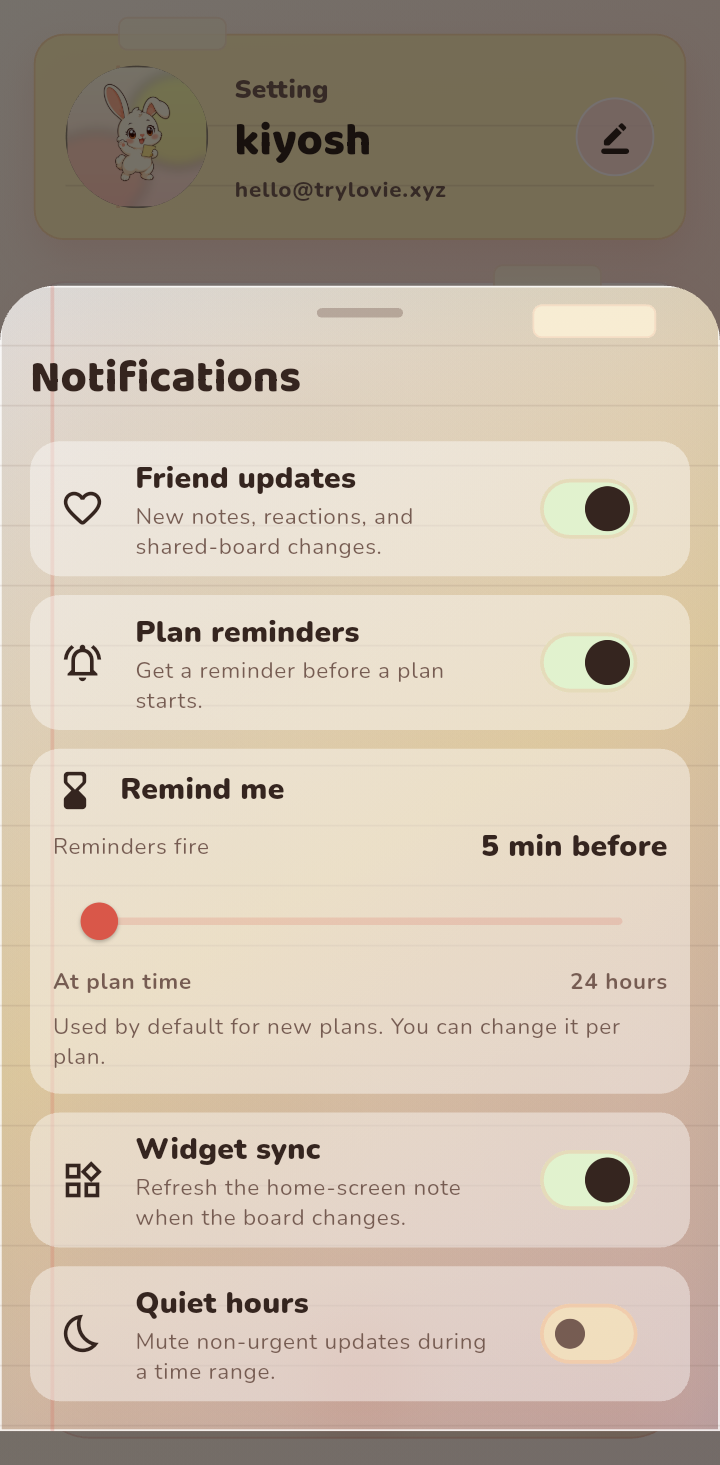
What each option does
- Friend updates: tells you when your person adds notes, reactions, or changes the board.
- Plan reminders: fires a reminder before a plan you set.
- Widget sync: keeps your home screen widget fresh when the board changes.
- Quiet hours: pauses non urgent updates during a time range you choose.
Step 1: Choose what you want
Open Notifications from your profile. Turn off anything you would rather check on your own terms, and keep the ones you actually value. There is no wrong answer here.
Step 2: Set quiet hours
If you do not want pings late at night, set quiet hours. Choose the window, like 10pm to 7am, and Lovie will hold non urgent updates until it passes. Genuine reminders still work the way you expect.
Step 3: Adjust reminders
For plan reminders, you can decide how early they fire. Five minutes before suits quick things, while a day before suits anything you need to prepare for.
Tips
- Fewer, better notifications are easier to trust. Keep the ones you would miss.
- If you feel flooded, turn off friend updates first and check the board when it suits you.
- Quiet hours are also a nice way to protect dinner or wind down time.